Name it yourself
Set a stable session name using the pencil beside its topic. Your name stays in place as generated topics and summaries change. Clear it whenever you want to return to the default name.
 Acheron
Each pane can show a short topic and a summary of the agent’s latest work. After a turn ends, Acheron can send recent terminal output to your configured model and update the label above the pane.
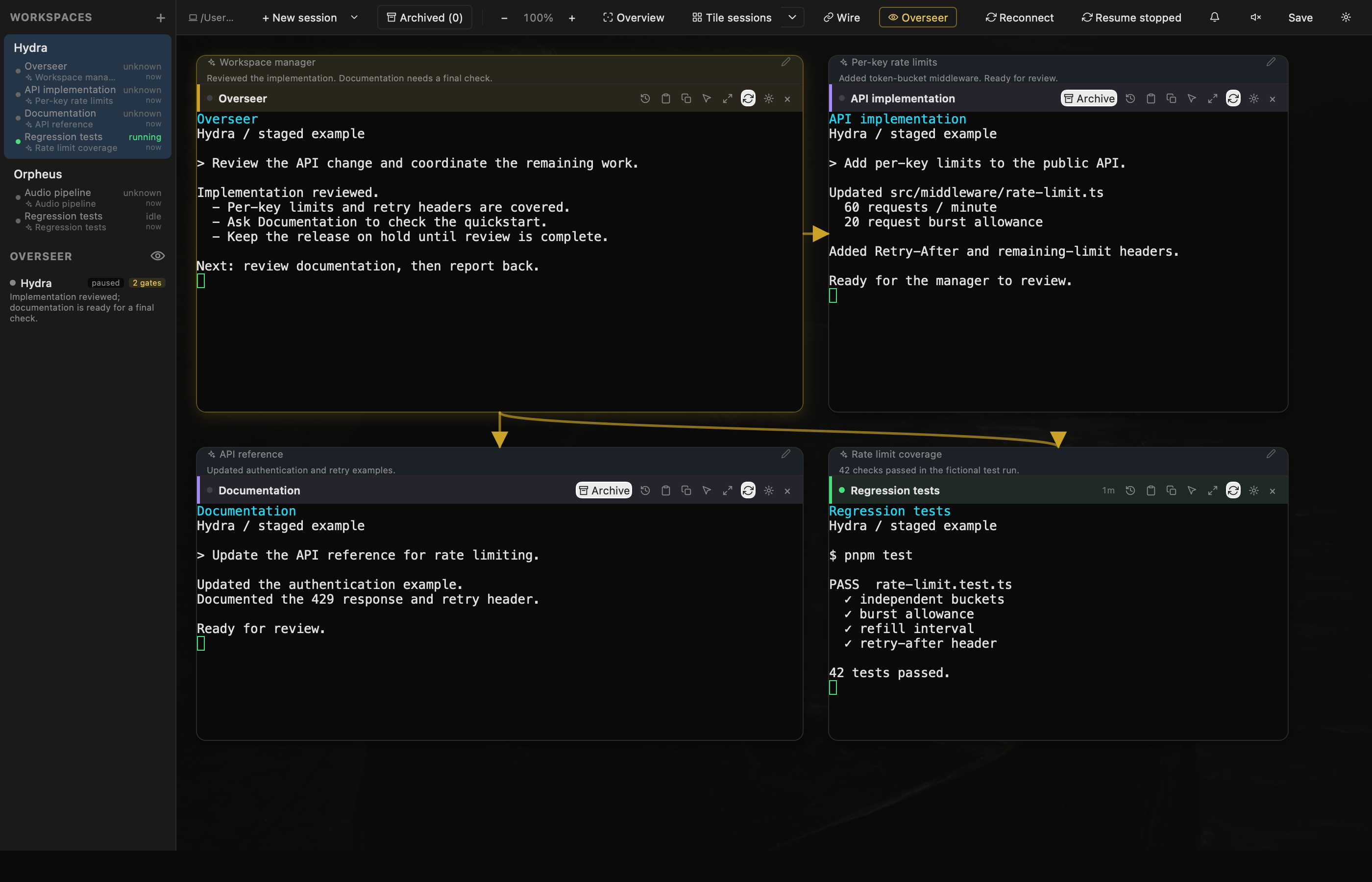
Set a stable session name using the pencil beside its topic. Your name stays in place as generated topics and summaries change. Clear it whenever you want to return to the default name.
Use Ollama for a local model or OpenRouter for a hosted one. Hosted analysis sends recent terminal output to that provider. Summaries are optional.
The desktop shares pane summaries with the companion app. If a model summary is unavailable, the phone can show recent lines from the terminal instead.
The history icon opens a session’s previous generated summaries, with titles and creation times. Search by title or summary to find an earlier piece of work. This is a history of generated summaries, not a complete record of every action.
Copy reads the latest assistant message from the session’s own Claude or Codex transcript, including code. If the transcript is unavailable, it falls back to that pane’s output and warns that long replies may be incomplete. It excludes the current input draft.